
Novation FLpad
Grid Controller for FL Studio

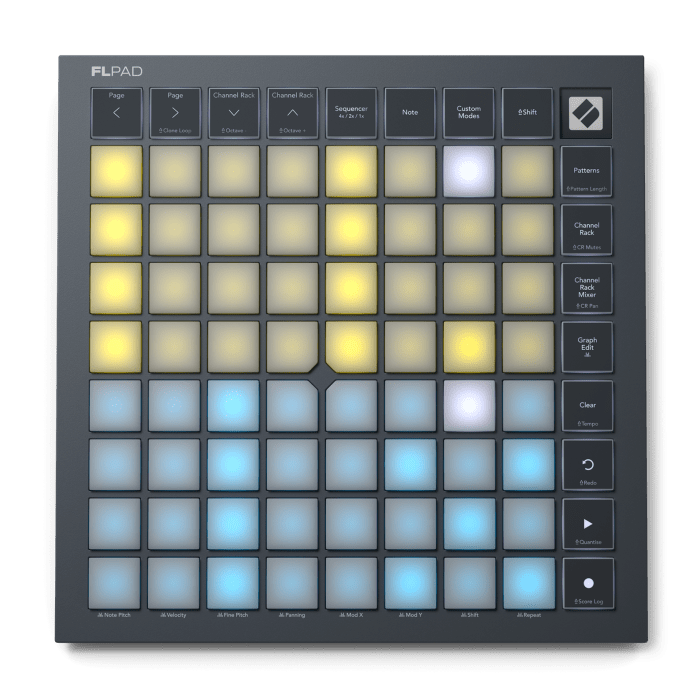
Designed for direct control of FL Studio
64 velocity-sensitive RGB pads for beats and melodies
Sequence up to four Channel Rack instruments simultaneously
Control Patterns, the Graph Editor, and the Channel Rack Mixer from the grid
Includes six months of FL Studio Producer Edition
Want to know when this item is back in stock? Send us your email address and we'll notify you as soon as it's available!
Our product experts are happy to help you!
The Novation FLpad is a grid controller developed in collaboration with Image-Line for direct control of FL Studio. The controller is entirely focused on the Channel Rack and, with 64 velocity-sensitive RGB pads, gives you a fast, physical way to create beats, melodies, and patterns. You can trigger samples, record drum parts, play melodies, manage patterns, and sequence up to four instruments simultaneously.
Although the FLpad’s design is reminiscent of a Launchpad, it was developed from the ground up for FL Studio. The firmware, controls, and various performance modes are tailored to the Channel Rack’s workflow. This means you’ll rely much less on the mouse and keyboard while producing.
Direct Control of the FL Studio Channel Rack
With the FLpad, you can select, trigger, and program samples and instruments directly from the Channel Rack. The 8x8 layout with RGB lighting clearly shows which instruments and steps are active. Sequencer mode offers three views. In 1x view, you use all 64 pads for a single instrument. In 2x view, you work with two instruments and 32 steps per sequencer lane. In the 4x view, you control four instruments simultaneously, each with 16 steps. This allows you, for example, to build up drums, bass, chords, and melody side by side.
64 velocity-sensitive RGB pads
The 64 pads arevelocity-sensitive, allowing for dynamic expression during finger drumming and melodic playing. Special layouts are available for FPC, Slicex, and Fruity Slicer. In Note mode, you can play melodic instruments chromatically or lock the notes to a selected scale. This makes it easier to play basslines, melodies, and chords directly from the controller. The pads can also send polyphonic aftertouch data. This can be used with compatible external plugins within FL Studio. FL Studio’s default plugins do not directly support polyphonic aftertouch.
Creating and Managing Patterns
FLpad features a separate Patterns view for creating, selecting, deleting, and duplicating patterns. You can also set the length of a pattern directly from the controller to 8, 16, 32, or 64 steps. This allows you to handle a large part of the arrangement and pattern construction without constantly having to return to the computer screen.
[[READMORE]]
Channel Rack for sequencing and performance
In Channel Rack mode, you can play multiple instruments directly from the Channel Rack. When you select an instrument, the FLpad displays the corresponding sequence, allowing you to add or delete steps immediately. With Channel Rack Mutes, you can mute individual instruments during playback. This is useful when building arrangements or during a live performance.
Channel Rack Mixer and Pan Control
The Channel Rack Mixer transforms the grid into eight horizontal faders that allow you to adjust the volume of different Channel Rack instruments. In Pan view, you use the same pads to control the stereo position for each channel. If more than eight instruments are in use, you can use the navigation buttons to scroll through the different channels.
Direct Access to the Graph Editor
With Graph Edit, you can adjust sequencer step parameters directly from the FLpad. You have access to Note Pitch, Velocity, Fine Pitch, Panning, Mod X, Mod Y, Shift, and Repeat. This allows you to adjust pitch, dynamics, timing, pan position, and repeats, among other things. Shift can be used to shift the timing of a step and add more groove, while Repeat is suitable for quick repeats, glitches, and stutter effects.
Transport and Navigation
FLpad features dedicated buttons for essential FL Studio functions. You can play, stop, and record, as well as control Undo, Redo, Quantize, Score Log, Clear, and Tempo. The navigation buttons let you scroll through sequencer pages and select a different instrument in the Channel Rack. In Note mode, the same buttons can be used in combination with the Shift key to change octaves.
Four Custom Modes
Using Novation Components, you can create and save up tofour custom modes. This allows you to determine which MIDI functions are assigned to sections of the grid. The Custom Modes can be used not only with FL Studio but also with other software and hardware. Novation Components is also used for firmware updates and content management.
Includes six months of FL Studio Producer Edition
The Novation FLpad comes with six months of FL StudioProducer Edition. This edition includes over 100 instruments and effects, support for unlimited audio clips, voice separation, and a collection of loops, samples, and presets. It also comes with a software bundle featuring additional instruments, effects, and tutorials. This package consists of Melodics, GForce Oberheim SEM, GForce Oberheim OB-EZ, GForce AXXESS, Klevgrand LUXE, Klevgrand Slammer, and UVI Prime 8+. Melodics offers lessons focused on learning to play with pads. GForce provides various synthesizers, while Klevgrand adds extra effects and drums. UVI Prime 8+ is based on the character of a classic drum machine and offers a collection of well-known electronic drum sounds.
USB-C and bus-powered
The FLpad connects via USB-C. The USB connection handles both data transfer and power, eliminating the need for a separate power adapter. The controller is class-compliant and can be used with recent Mac, Windows, and iOS systems. There is also a Kensington Security Slot on the housing.
The top and bottom of the housing are made from 85% recycled ABS.
Novation FLpad features:
- 64 velocity-sensitive RGB pads
- 8x8 pad configuration
- polyphonic aftertouch
- Specially developed for FL Studio
- Developed in collaboration with Image-Line
- Direct integration with the FL Studio Channel Rack
- Sequencer mode for 1, 2, or 4 instruments
- up to 64 steps per instrument
- 32 steps per instrument with two sequencer lanes
- 16 steps per instrument with four sequencer lanes
- Note mode for chromatic playing and scales
- Special layouts for FPC, Slicex, and Fruity Slicer
- Create, select, delete, and duplicate patterns
- Pattern length adjustable to 8, 16, 32, or 64 steps
- Channel Rack mode for sequencing and performance
- Channel Rack Mutes for muting instruments
- Channel Rack Mixer for volume control
- Pan mode for stereo positioning
- Graph Edit for Note Pitch, Velocity, Fine Pitch, Panning, Mod X, Mod Y, Shift, and Repeat
- 4 Custom Modes via Novation Components
- Transport functions for Play/Stop and Record
- Undo/Redo
- Quantize
- Score Log
- Clear
- Tempo
- 2 Page Buttons
- 2 Channel Rack/Octave knobs
- 7 mode buttons
- USB-C port
- USB bus power
- Kensington Security Slot
- Class-compliant
- Compatible with recent Mac, Windows, and iOS systems
- Top and bottom made from 85% recycled ABS
- Dimensions: 24 x 24 x 1.8 cm
- weight without accessories: 0.83 kg
- Weight with accessories: 0.88 kg
Includes:
- USB-C to USB-A cable
- 6 months of FL Studio Producer Edition
- Melodics
- GForce Oberheim SEM
- GForce Oberheim OB-EZ
- GForce AXXESS
- Klevgrand LUXE
- Klevgrand Slammer
- UVI Prime 8+
| Brand | Novation |
|---|---|
| Ean Code | 815301001904 |
| Article number | 76941 |
| Size (product) | 24 cm x 24 cm x 1,8 cm |
| Size (packaging) | 27,6 cm x 4,4 cm x 25 cm |
Bekijk hier alles over de Novation FLpad & FLpad Mini!
Meet the new FLpad and FLpad Mini, developed in collaboration with Image-Line. Our very first grid controller was designed from the ground up for quickly and intuitively creating beats in FL Studio’s Channel Rack.
Use the 64 velocity-sensitive RGB pads to play or sequence drums and melodies, slice samples, and edit Patterns. Sequence up to four instruments at once and effortlessly arrange your ideas.
With dedicated buttons for transport, mode switching, and undo/redo, you maintain complete control. Plus, using Novation Components, you can easily create custom layouts for FL Studio or other software and hardware.
 Blog
Op zo’n beetje alle toetsinstrumenten vind je tegenwoordig de mogelijkheid tot het gebruiken van MIDI. Maar wat is MIDI nou eigenlijk? We leren je graag wat meer over de waar MIDI vandaan komt en geven antwoorden op veel voorkomende vragen.
Read more in our blog