
Arturia KeyStep mk2
MIDI keyboard controller en sequencer

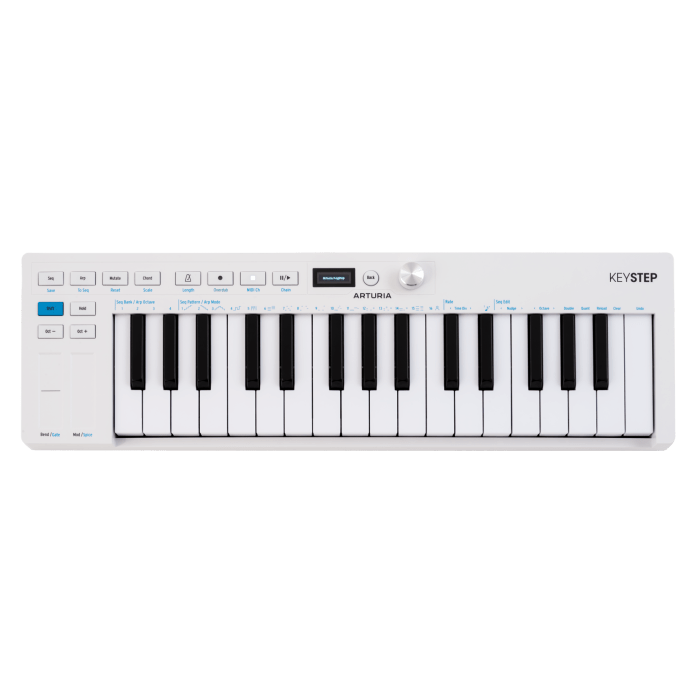
32 Slimkey keys with aftertouch
polyphonic 64-step sequencer
arpeggiator with 16 modes
Generative Mutate, Spice, and Dice functions
MIDI, USB-C, Sync, and CV/Gate connections
Want to know when this item is back in stock? Send us your email address and we'll notify you as soon as it's available!
Our product experts are happy to help you!
The Arturia KeyStep mk2 is a compact MIDI keyboard controller and sequencer for software instruments, hardware synthesizers, and modular systems. The 32-key Slimkey keyboard combines velocity sensitivity with aftertouch, while the polyphonic sequencer, arpeggiator, and generative features help you develop melodies, chords, and patterns. With USB-C, MIDI DIN, Sync, and four CV/Gate outputs, the KeyStep mk2 serves as the central control hub for a hybrid setup. You can use it with a DAW, or without a computer to control synthesizers, drum machines, and Eurorack modules.
Expressive Slimkey Keyboard
The 32-key Slimkey keyboard responds to velocity and aftertouch. This allows you to add dynamics, modulation, and other parameter changes while playing. The capacitive touch strips control pitch bend and modulation without traditional wheels taking up extra space. Use the octave buttons to shift the keyboard’s range. Chord Mode lets you play or record complete chords, while Scale Mode maps the keys to a selected scale. This ensures that melodies and improvisations stay within the set key.
Polyphonic Step Sequencer The polyphonic step sequencer supports patterns of up to 64 steps and eight simultaneous notes per step. You can program patterns step by step or play them in real time. Unquantized recording is also possible, preserving the timing of your performance. With overdub, you can add notes to an existing pattern. Pitch bend and modulation movements can also be recorded within a sequence. Multiple patterns can be linked together, allowing you to build longer musical structures and complete arrangements.
Arpeggiator with Sixteen Modes
The arpeggiator features sixteen playback modes, including Poly, Walk, Pattern, and Random. In addition to traditional ascending and descending patterns, you can use these to create melodic variations and rhythmic phrases. Phrase Arp adapts an existing pattern to the notes you play on the keyboard. An arpeggio can be transferred directly to the sequencer. You can then customize the pattern by adding notes, inserting rests, changing pitches, or adjusting step lengths.
Mutate, Spice, and Dice
With Mutate, you can transform a sequence or arpeggio with the press of a button. The feature generates new melodic variations based on the existing pattern. This preserves the original character while sparking new ideas. Spice and Dice add controlled variations to timing, dynamics, gate length, and octave placement. The corresponding performance controls allow you to modify patterns during a performance or jam session without stopping playback.
[[READMORE]]
OLED Display and RGB Feedback
The OLED display shows settings, parameter values, and information about the active function. Use the clickable encoder and Back button to navigate through the menus and adjust settings directly on the device. RGB lighting provides additional feedback on functions, modes, and the sequencer’s status. The transport buttons control play, stop, and record. Use Tap to set the tempo manually, and the Hold function lets arpeggios and patterns continue playing after you release the keys.
Control via MIDI, USB, and CV
Use the 5-pin MIDI input and output to connect synthesizers, sound modules, drum machines, and other MIDI devices. MIDI Thru is also supported. The USB-C port sends MIDI to a computer or tablet and powers the KeyStep mk2. For modular equipment, there are four 3.5 mm CV/Gate outputs: Pitch, Gate, Mod 1, and Mod 2. The modulation outputs can be linked to velocity, aftertouch, or the modulation strip, among other things. Additionally, MIDI-to-CV conversion allows you to use an external MIDI keyboard to control modular equipment.
Synchronization with Hardware
The 3.5 mm Sync input and output allow the KeyStep mk2 to synchronize with drum machines, sequencers, synthesizers, and other equipment. Clock and start/stop commands can be sent and received. You can connect a sustain pedal, footswitch, or expression pedal to the TRS pedal input. The KeyStep mk2 also features a power switch and a Kensington lock slot.
Compact for Studio and Stage
The KeyStep mk2 is 48.4 cm wide, 14.5 cm deep, and 5 cm high. Its low profile allows it to be placed in front of other equipment without taking up much workspace. Weighing 1.1 kg, it’s also suitable for mobile productions and live performances.
Included Software
Analog Lab Intro offers more than 500 synthesizer and keyboard sounds from the Arturia collection. The software runs standalone and as a plug-in in a DAW. Ableton Live Lite provides an environment for recording, arranging, and producing. MIDI Control Center lets you manage MIDI settings, synchronization, CV configurations, and other functions of the KeyStep mk2. The Arturia Software Center is used to install, activate, and update the included Arturia software.
Arturia KeyStep mk2 features:
- 32 velocity-sensitive Slimkey keys with aftertouch
- polyphonic step sequencer with up to 64 steps
- up to 8 simultaneous notes per sequencer step
- Real-time, step, and unquantized recording
- pattern chains for longer arrangements
- overdub and undo functions
- recording of pitch bend and modulation movements
- Arpeggiator with 16 modes
- Phrase Arp for adapting patterns to played notes
- Direct conversion from arpeggio to sequence
- Mutate function for melodic variations
- Spice and Dice functions for real-time pattern variations
- Chord Mode and Scale Mode
- OLED display with clickable encoder
- RGB feedback for functions and modes
- 2 capacitive touch strips for pitch bend and modulation
- Transport controls and Tap/Hold function
- USB-C for MIDI and power
- 5-pin MIDI input and output
- Support for MIDI Thru
- 3.5 mm sync input and output
- 4 CV/Gate outputs
- MIDI-to-CV conversion
- TRS input for sustain or expression pedal
- On/off switch
- Kensington lock slot
- Support for iPad with a compatible adapter
Included software:
- Arturia Analog Lab Intro with over 500 sounds
- Ableton Live Lite
- Arturia MIDI Control Center
- Arturia Software Center
Included: Arturia KeyStep mk2 + USB-A-to-USB-C cable
Arturia KeyStep mk2 specifications:
- MIDI keyboard controller and sequencer
- Number of keys: 32
- Key type: Slimkey
- Touch sensitivity: Yes
- Aftertouch: Yes
- sequencer: polyphonic, 8 notes per step
- Maximum pattern length: 64 steps
- Arpeggiator modes: 16
- MIDI input: 1 x 5-pin DIN
- MIDI output: 1 x 5-pin DIN
- Sync input: 1 x 3.5 mm jack
- Sync output: 1 x 3.5 mm jack
- CV/Gate outputs: Pitch, Gate, Mod 1, and Mod 2
- Pedal input: 1 x 6.35 mm TRS
- USB port: USB-C
- Power supply: via USB-C
- Dimensions: 48.4 x 14.5 x 5 cm
- Weight: 1.1 kg
- Color: white
- Item number: 430301
| Brand | Arturia |
|---|---|
| Ean Code | 3760033532417 |
| No. of keys | 32 |
| Color | white |
| Touch sensitve | yes |
| Aftertouch | yes |
| Rotary Encoder | 1 |
| Faders | not applicable |
| Pads | not applicable |
| Pedal input | yes |
| Display | yes |
| Article number | 76693 |
| Size (product) | 5 cm x 48,4 cm x 14,5 cm |
| Size (packaging) | 53,3 cm x 7,9 cm x 17,8 cm |
KeyStep mk2 - Overzicht
Join Brendan for an introduction to the KeyStep mk2. Discover the sequencer, generative features, controls via the OLED display, and the extensive CV, MIDI, and USB-C connections. A central component for hybrid setups that lets you keep developing your musical ideas.
 Blog
Blog
Op zo’n beetje alle toetsinstrumenten vind je tegenwoordig de mogelijkheid tot het gebruiken van MIDI. Maar wat is MIDI nou eigenlijk? We leren je graag wat meer over de waar MIDI vandaan komt en geven antwoorden op veel voorkomende vragen.
Read more in our blog