
StudioLogic Numa X Piano 88
digitale piano / midi controller 88 toetsen
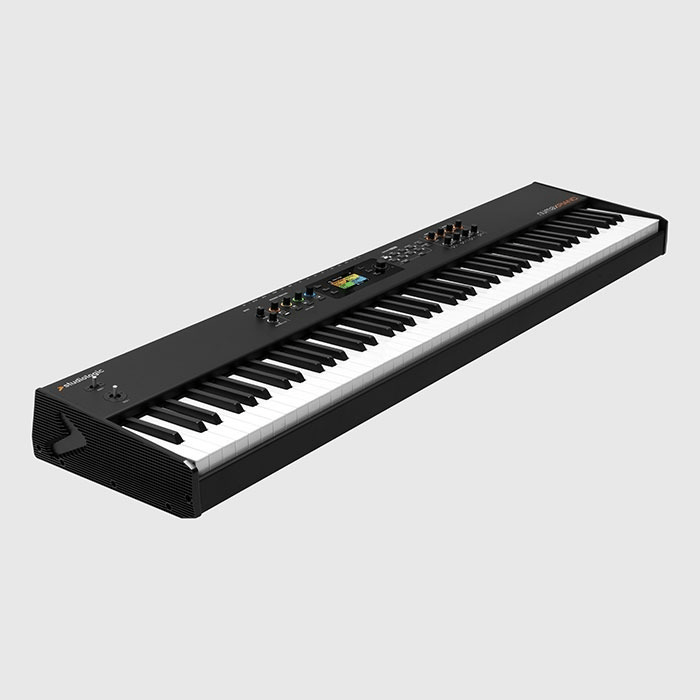
extensive adjustable 4-zone MIDI controller
also standalone stage piano
built-in digital mixer
USB audio interface
Want to know when this item is back in stock? Send us your email address and we'll notify you as soon as it's available!
Our product experts are happy to help you!
The Numa X from Studiologic is the perfect combination between a stage piano, a four-zone MIDI controller and a 4-track digital mixer. This makes it equally suitable for studio and live applications.
Studiologic has developed a user interface that works with adaptive color coding. The colors are always synchronized with one of the four selected zones, allowing you to see at a glance what you are doing.
The Numa's sound source is based on a mix of sampling, wave shaping and physical modeling. The acoustic piano sounds have DSP effects to simulate string and duplex resonance, plu release, key-off and damper sounds. On top of that, 8 insert FX are also available.
[[READMORE]]
There is plenty of memory available on the Numa for additional sounds, which are available on Studiologic's website. With the Numa Manager app, you can organize and manage your entire library of sounds on your computer. The firmware can also be updated via this app.
The piano is simultaneously a USB audio interface, so you can exchange audio files between your computer and the instrument. There are also 4 audio inputs and a 4-track digital mixer available, with gain, bass, mid, high controls. This allows you to use the Numa as a mixer for external sources, such as bass, guitar or another synth, for example.
Features:
- Keyboard
- TP/110 Premium Hammer Action
- Aftertouch
- Strike sensitivity
- Soft, Medium, Hard, Firm (programmable)
- Keyboard sensitivity control
- Balance black/white keys
- Functions
- 250 user programs
- Zoom function to quickly edit Zone parameters
- 4 Zones assignable to internal sounds or external MIDI
- Split/Keyrange for each Zone
- Dedicated Split button
- Favorites
- 16 Favorites with 24 programs each
- Favorite content preview on display
- Global equalizer
- Bass, Mid, Treble gain
- Mid frequency control
- Sound generation
- 8 sound banks with over 200 factory sounds
- New sounds installable with the Manager app
- Maximum polyphony 300 voices
- Acoustic pianos
- Acoustic modeling technology
- Release samples, damper and key sounds
- Zoom controls: tone, string resonance, duplex, damper sound
- Electric pianos
- Electric modeling technology: Physical modeling of vintage electric and hybrid models
- Zoom controls: Hammer, Offset, Tine, Damper Noise
- Keyboards, Bass & Guitars, Organs, Synthesizers, Orchestral, Other
- Zoom Controls: Filter Cutoff, Resonance, Attack, Release
- Effects / Processing
- 8 independent Insert FX (2 for each Zone)
- FX1
- Distortion, Overdrive, Auto Wah, Pedal Wah, Auto Pan, Tremolo, Vibrato, Equalizer, Compressor
- FX2
- Chorus1, Chorus 2, Flanger 1, Flanger 2, Phaser100, Phaser90, Phaser HMX, Phaser Pad, Rotary, Auto Pan, Tremolo, Vibrato, Equalizer, Compressor
- Master Delay
- Delay, Pan Delay
- Master Reverb
- FDN technology (Feedback Delay Network) Room 1, Room 2, Hall 1, Hall 2, Cath. 1, Cath. 2, Plate 1, Plate 2, spring 1, spring 2
| Brand | StudioLogic |
|---|---|
| Ean Code | 8034141640650 |
| No. of keys | 88 |
| Touch sensitve | yes |
| Aftertouch | yes |
| Rotary Encoder | 8 |
| Faders | not applicable |
| Pads | not applicable |
| Pedal input | yes |
| Display | yes |
| Article number | 74407 |
| Size (product) | 12,3 cm x 126,5 cm x 31 cm |
| Size (packaging) | 135 cm x 20 cm x 40 cm |
 Blog
Blog
Op zo’n beetje alle toetsinstrumenten vind je tegenwoordig de mogelijkheid tot het gebruiken van MIDI. Maar wat is MIDI nou eigenlijk? We leren je graag wat meer over de waar MIDI vandaan komt en geven antwoorden op veel voorkomende vragen.
Read more in our blog